Appilates User Manual for Studios
Configure class-passes
Class-passes act like admission tokens for your Pilates classes. They simplify the sales process for both you and your clients. Typically, you’ll want one class-pass per pricing tier offered at your studio.
Examples:
- Private reformer class
- Group mat class
- Beginner reformer course
Appilates supports two types of class-passes:
- Single class admission — for regular bookings; one pass equals one booking
- Course & Series — for multi-session courses; learn more in Courses
Setup a class-pass
Navigate to Sales > Passes & products, then either:
- Use the top-right menu Add new product, pass or membership
- Tap the (+) symbol next to your existing class-passes
Follow the assistant using Next and Back to complete setup.
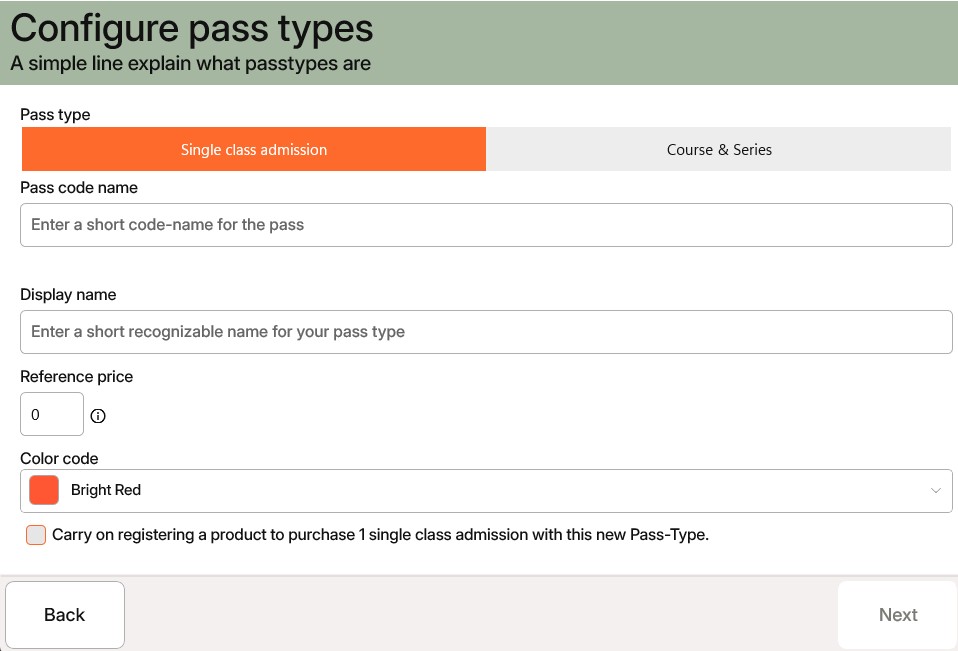
Step-by-step setup
- Choose pass type: Select either Single class admission or Course & Series
- Pass code name: A short internal identifier used in Class configuration to grant booking access. Use a consistent naming strategy like
private-reformer,group-reformer, orgroup-mat - Display name: This is shown to clients and used in public listings
- Reference price: The value you associate with one class-pass. Actual pricing is defined via a Pass product bundle or subscription, where you can apply discounts for bulk purchases
- Colour code: Helps visually match class schedules with the related class-pass. Use consistent colours for clarity
A class-pass alone isn’t sellable — it must be linked to a product.
We recommend setting up a sales product that offers a single pass. Tick the Carry on registering a product checkbox to create both the class-pass and its associated product in one go.
Read more about Setup a class bundle for sales here.
Related articles
All Help categories
Here all all the main help categories in the Appilates user manual.